Which Lubi VPN Asia Server Should You Choose?

Choose a nearby Lubi VPN server for ordinary browsing, calls, and other latency-sensitive tasks. Choose the location required by a regional service only when that service’s current rules allow your use; if the underlying connection, account, or device is the problem, changing servers will not fix it.
The useful question is therefore not “Which Asia server is best?” It is “Which location satisfies this task with the fewest trade-offs?”
Decide which end of the connection matters
A VPN connection has more than one relevant path. Traffic travels from your device to the VPN server, then onward to the site, app, game, or work system you are using. The shortest first leg may feel responsive, while the destination service may care about the public location of the VPN server.
Classify the task before opening the server list:
- For general browsing, messaging, video calls, or gaming, responsiveness and stability usually matter more than country.
- For a service tied to a particular region, the required location may matter more than proximity.
- For a company system, use the location and connection method required by your employer rather than a personal preference.
- For troubleshooting, preserve the same task and network so a server change is the only variable.
This is the product-level decision: pick from the locations available in Lubi VPN, then judge that choice against the real task. Distance and routing are general network concepts; the app and plan determine which of those locations you can actually select.
Use a nearby server as the performance default
For an ordinary task with no regional requirement, begin with a nearby available server. Distance adds travel time to a network path: Cloudflare’s latency explainer identifies distance as a principal cause of network latency and distinguishes latency from bandwidth and throughput. That is why proximity is a sensible default for interactive work.
Nearby does not mean guaranteed fastest. Your ISP may send traffic along an indirect route, congestion can change, and the destination itself may respond slowly. Treat the map as a shortlist, not a speed ranking. If the first nearby choice works smoothly for the activity you care about, there is no benefit in cycling through every other location.
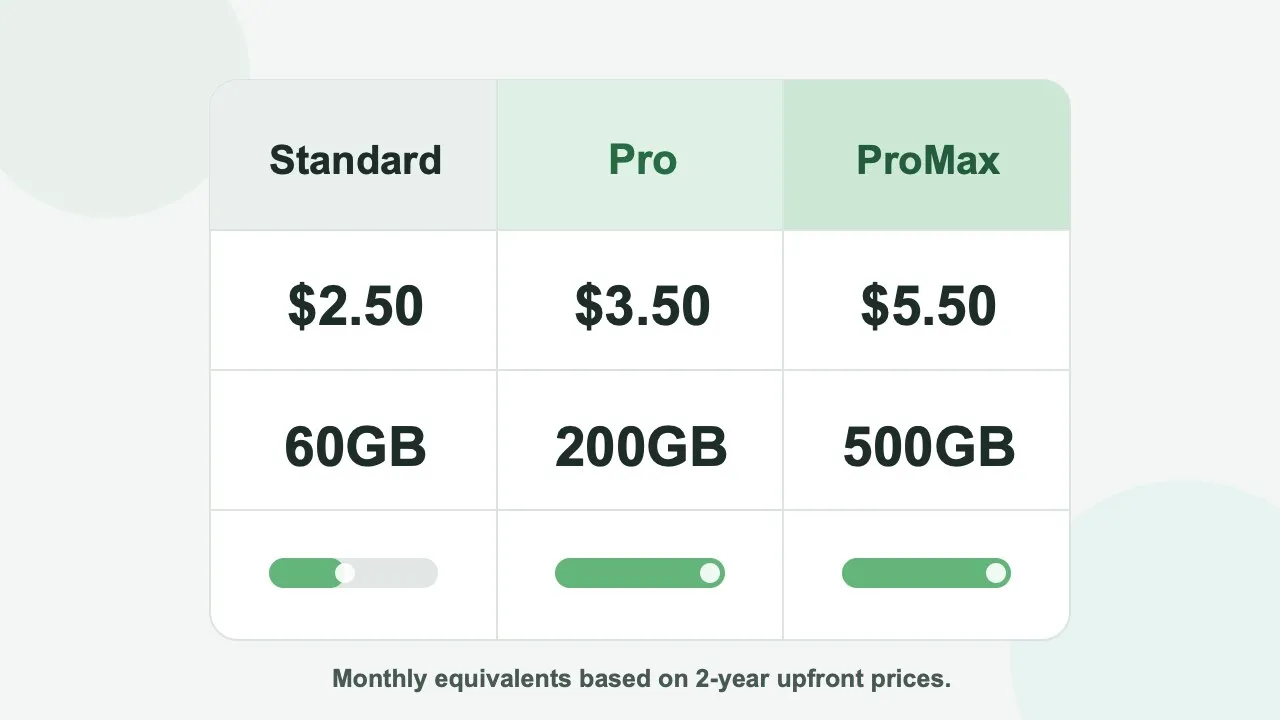
Lubi VPN Standard includes selected server locations. Pro and ProMax include all server locations, and Taiwan servers are available only on Pro and ProMax. A location that does not appear under Standard may therefore be outside that plan’s coverage rather than temporarily broken. Use the locations currently shown as available in the app instead of relying on an old list copied elsewhere.
Let the service’s region outrank proximity when necessary
When the task depends on regional content, a nearby server in the wrong place does not satisfy the task. First identify the exact service, title, account, and location requirement. Then read the service’s current official policy before choosing a matching server.
Do not assume that changing the public IP address guarantees access. Netflix, for example, says in Changing the country of your account that catalogs differ by country and that using a VPN hides the region and limits viewing to titles available globally. Other services may use account country, billing details, device location, licensing rules, or VPN detection. Their rules can also change.
The decision order is: confirm that your account is entitled to the service, check whether its rules permit the intended use, and only then choose the required location if Lubi VPN makes it available under your plan. A more distant choice may be the correct one for that task even if it adds delay.
Read the symptom before you switch
Server switching helps only when the symptom points to the route or the selected location.
- Everything is slow before Lubi VPN connects: test another Wi-Fi or mobile connection. A server change cannot restore capacity missing from the base network.
- Several services become less responsive after connecting: reconnect once, then compare one other nearby server under the same conditions.
- A call or game stutters while downloads look normal: judge delay and consistency during the real activity, not download speed alone. The gaming latency guide explains why route quality matters for interactive traffic.
- Only one site or app refuses access: read its error and official support page. The cause may be an account, subscription, region, or VPN policy rather than the selected server’s performance.
- A required location is unavailable: check plan coverage. Reinstalling the app or repeatedly reconnecting will not add a location excluded from the plan.
- Every location connects but feels similarly slow after your monthly high-speed allowance is used: Lubi VPN moves you to speed-limited backup servers rather than disconnecting you. Switching locations does not restore the high-speed allowance.
- The problem began after changing hotels, carriers, or countries: create a new baseline. The route you tested on the previous network no longer applies.
This symptom-first approach prevents a regional restriction from being misread as a slow server, or a weak local connection from being blamed on Lubi VPN.
Know what a different server cannot repair
Changing Lubi VPN servers cannot fix an overloaded home router, weak Wi-Fi signal, exhausted mobile-data allowance, slow destination website, outdated device, or background download. It also cannot renew a subscription, recover an account, satisfy a payment requirement, change an app-store country, or override a content provider’s terms.
If every connection fails, disconnect Lubi VPN and test the same activity. If the problem remains, work outward from the device and base network. If only one service fails, check that service. If the problem appears only while connected and affects several services, a nearby alternative is a reasonable next test.
These boundaries matter because endless server hopping changes the evidence without addressing the cause. A new IP route is useful for a routing or location problem; it is not a general repair tool.
Let the Lubi VPN app define the shortlist
The locations shown as available in the Lubi VPN app are your current candidate set. If a location is not included in Standard, compare the nearby choices that are actually available rather than treating the missing location as a failed connection; Pro and ProMax expose the full location range, including Taiwan.
The general article on distance, routing, and VPN server location contains the full comparison method. For Lubi VPN, the product-specific rule is simpler: the app tells you what can be selected, the plan explains why some locations are absent, and the monthly high-speed allowance explains why every available choice may slow in the same way.
Follow the same selection loop each time
Start with the task, not the country list. Choose a nearby available Lubi VPN server when performance is the priority; choose the permitted content location when region is the requirement. Test the actual activity, read the symptom, and switch once only when the evidence points to the server or route.
If switching does not change the result, stop and diagnose the base network, device, account, or service. This loop produces a defensible choice without promising that one Asia server will be fastest for every person, network, or destination.